
 India
India UAE (Dubai)
 Australia
 Philippines
 Thailand
 Malaysia









 Calendar Management
 Staff Management
 Inventory & Stock Mgt
 Web Mobile App
 Business Dashboard
 Billing & Invoicing
 Multi Branch management
 Integrations
Features to Look for in Pet Daycare Management Software (2026 Guide)

9 mins Read
Jul 27, 2026

Share
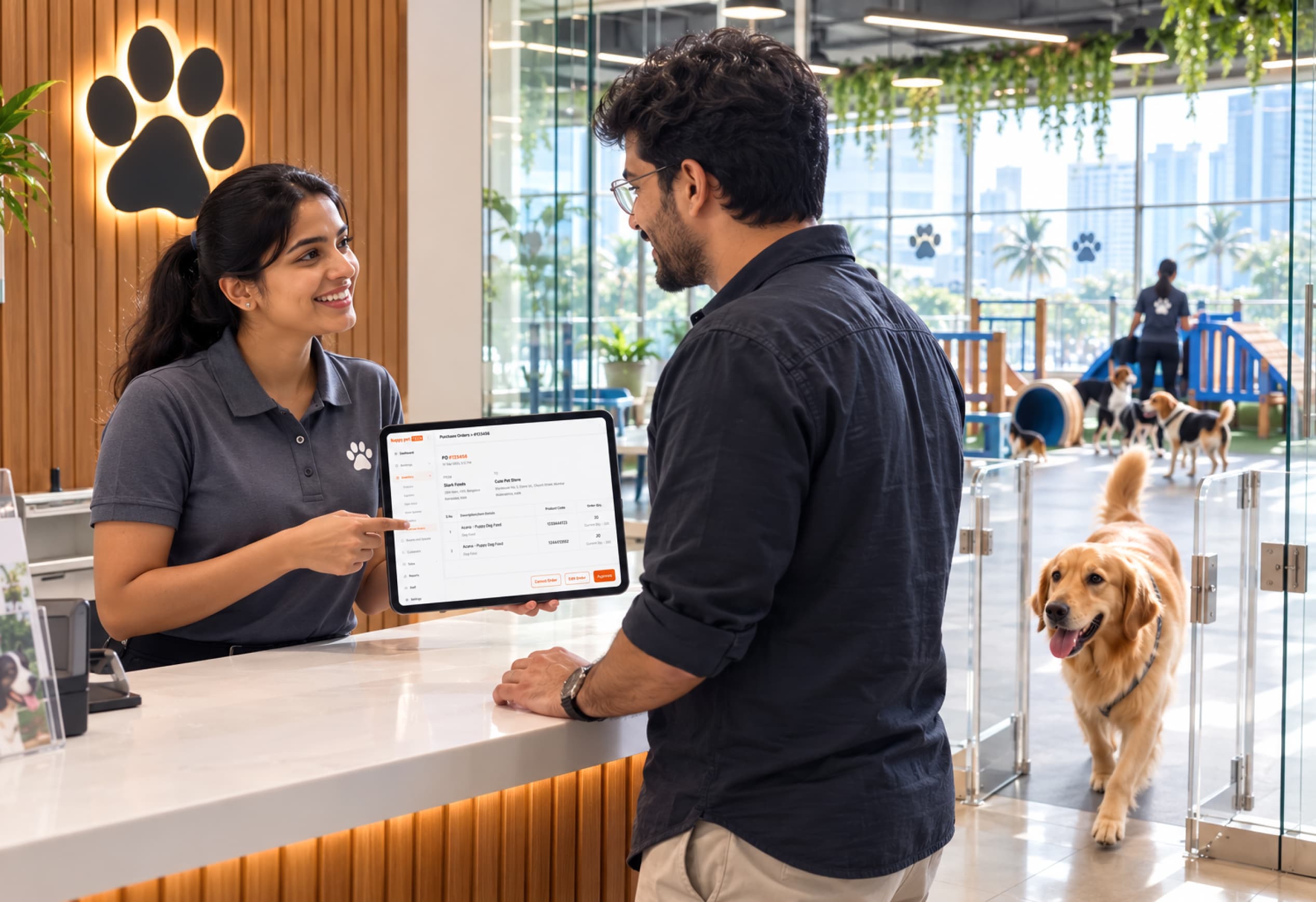
Managing a modern pet daycare requires balancing real-time operational safety, multi-pet log tracking, staff scheduling, client communications, and complex package billing. In 2026, relying on pen-and-paper logs, spreadsheets, or disjointed messaging apps is no longer just inconvenient—it actively limits business growth, creates costly staff overhead, and introduces operational risks.
Whether you are launching a new pet daycare or upgrading an existing facility, selecting the right pet daycare management software is one of the most critical decisions you will make. This guide outlines why manual daycare management is costing you more than you think, details the 7 essential features of dog daycare software you must look for, compares top market platforms, and provides an actionable buying checklist.
Common Operational Challenges Pet Daycare Businesses Face Without Dedicated Software
- No real-time visibility into capacity or attendance: Without a centralized daycare management system, management cannot immediately confirm how many dogs are in play yards, which dogs have arrived, or who is scheduled for pick-up.
- Double bookings during peak hours: Managing reservations manually via phone calls, WhatsApp messages, or paper calendars creates dog daycare booking problems and frequent pet daycare overbooking during holiday seasons and weekends.
- Staff unaware of individual pet care needs: Critical information—such as dietary restrictions, medication schedules, behavioral triggers, or dog-to-dog aggression notes—gets lost in shift changes when managed manually.
- Manual billing errors and missed package charges: Staff frequently forget to mark off used days on paper punch cards, fail to log add-on services (such as extra walk sessions or specialized feeding), or miscalculate multi-day packages.
- No structured way to update pet parents during the day: Front-desk staff spend hours answering repetitive inbound calls from anxious owners asking, "How is my dog doing?" instead of focusing on facility operations and safety.
4 Core Feature Pillars to Look for in Pet Daycare Software
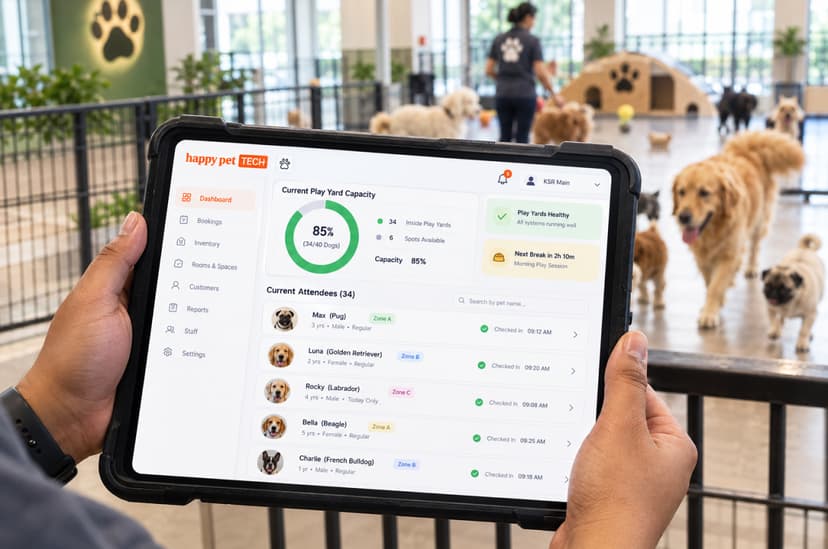
1. Digital Check-In, Attendance & Capacity Management
The morning drop-off rush can quickly turn chaotic without an efficient dog daycare check-in system. Modern software streamlines entry management while keeping your facility operating safely within capacity limits.
- Digital Check-In & Entry Management: Replace paper registers with single-tap or scan check-ins, logging exact arrival times and verifying account status without front-desk bottlenecks.
- Real-Time Attendance Visibility: Supervisors and play-yard attendants can view live attendance counts from tablets or mobile devices, ensuring accurate staff-to-dog ratios across play zones.
- Slot Allocation & Capacity Caps: Set daily capacity limits per play group or service zone to prevent overbooking during peak seasons, and manage recurring reservations for regular clients.
- Structured Check-Out Workflow: Verify that all belongings (leashes, crates, medication) are returned and that daily fees or package credits are automatically processed upon exit.
Advanced capacity terms like "run optimization" (assigning multiple kennel runs to maximize space efficiency) are specific to legacy boarding/kennel platforms like Kennel Connection. Ensure your software’s capacity controls fit your specific layout—whether open play yards, runs, or structured zones.
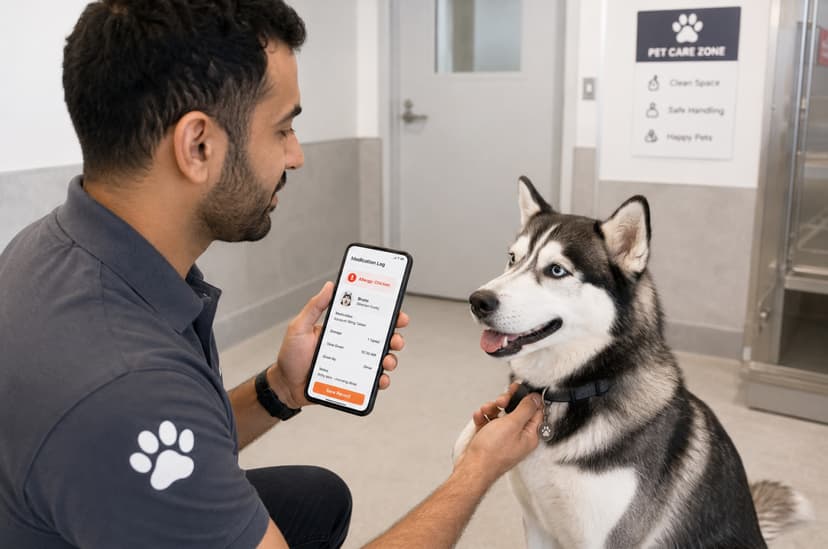
2. Individual Pet Care, Activity Logs & Medical Profiles
Every pet in your care requires tailored attention. An integrated pet records system and care tracker guarantee that daily care protocols are executed flawlessly and recorded systematically.
- Daily Activity & Care Tracking: Log feeding schedules, playtime sessions, potty breaks, rest periods, and medication administration in real-time.
- Shared Behavior Notes: Keep behavior and temperament notes accessible to all shift handlers so morning insights seamlessly carry over to afternoon staff.
- Medical & Allergy Flags: Highlight allergy alerts, health conditions, or behavioral triggers (e.g., resource guarding, crate anxiety) directly on the pet’s dashboard.
- Vaccination & Service History Logs: Store vaccination records, feeding preferences, and complete service histories per client to personalize care for returning pets.
Upload-and-approval vaccination workflows (where pet parents upload documents via a mobile portal and staff review them) are prominent in US platforms like Gingr and Kennel Connection. Most localized tools store vaccination dates and records directly in the pet profile.

3. Automated Pet Parent Communication & Daily Updates
Building long-term client trust depends on transparent, timely communication. A modern client update system reassures pet parents while eliminating daily operational interruptions.
- Automated Arrival & Pick-Up Reminders: Trigger automated SMS or messaging notifications for drop-off and pick-up times to reduce late pick-ups and no-shows.
- Session Summaries & Daily Care Updates: Send structured end-of-session activity updates directly to pet parents, keeping them informed about their dog's day.
- Reduced Front-Desk Inbound Calls: Proactive updates eliminate the constant stream of "how is my dog doing?" calls, enabling desk staff to concentrate on on-site safety and service.
Terms like "pet parent portal" and custom "report cards" are central marketing features for platforms like Gingr. Evaluate whether your client base prefers direct app portals or instant messaging channels like WhatsApp for daily updates.
4. Staff Task Management, Billing & Financial Reporting
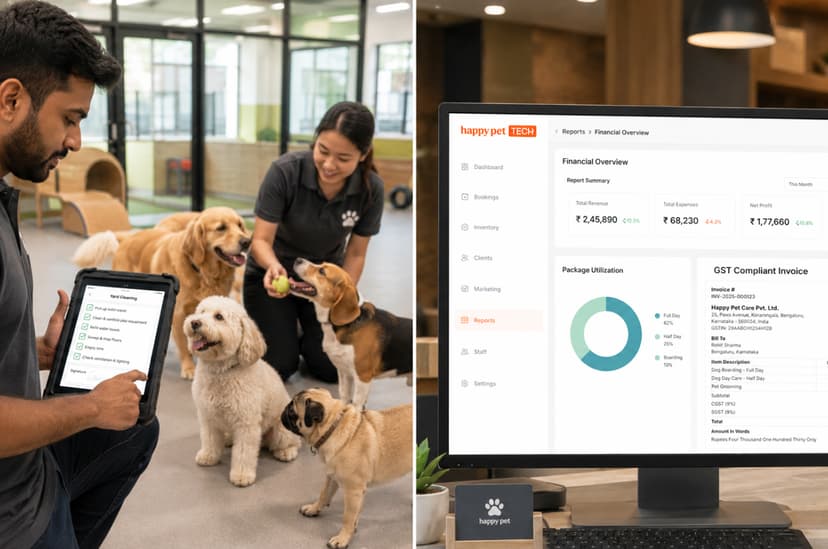
A successful pet daycare requires smooth internal coordination and accurate billing. Combining daycare staff scheduling software with automated financial tools protects your margins and streamlines operations.
- Shift Task Assignment: Assign operational duties—such as yard sanitization, water bowl refreshes, feeding prep, and medication delivery—to individual team members per shift.
- Mobile Task Tracking: Enable play-yard attendants to update activity logs and check off tasks directly from mobile devices without leaving animals unattended.
- Automated Invoicing & Package Management: Generate invoices automatically upon check-out and manage multi-day pass balances, automatically deducting session credits as pets check in.
- Business & Tax Compliance Reporting: Access revenue reporting by service, date range, or staff member. Ensure the software supports local tax regulations (such as GST in India or VAT in the UAE) and native currency gateways.
What to Prioritise When Choosing Pet Daycare Software
Use this buying checklist when testing free trial dog daycare software or evaluating platforms for your business:
- Check-In Speed Under Peak Volume: Does the digital check-in interface run quickly without slowing down during morning rush hours?
- Mobile Usability for Yard Staff: Can handlers log care events and complete task lists on mobile devices without logging into a desktop computer?
- Flexible Package Billing: Does the billing engine adapt to your pricing structures (daily rates, weekly passes, monthly memberships, or packages)?
- Localization & Tax Compliance: Is the platform built for your operating region, offering native support for local tax rules (e.g., GST), local currencies, and payment systems?
- Onboarding & Support: Does the provider offer structured staff onboarding, data migration assistance, and responsive customer support when operational questions arise?
Conclusion
For pet daycare operators, especially those in India, the UAE, and emerging markets HappyPet.tech stands out as the premier solution. Unlike legacy Western platforms that charge high USD subscription rates without supporting regional tax laws, HappyPet.tech is custom-built for local business needs. With native GST/VAT compliance, local payment gateway integrations, mobile-first task management for shift staff, and comprehensive package tracking, HappyPet.tech delivers everything your business needs to scale safely and profitably in 2026.
Pet Business Licences in Malaysia: What Pet Shops, Cat Hotels, Groomers and Vet Clinics Need (2026)
Oct 14, 2026

Malaysia Pet Industry: The Real Story Behind Malaysia's $505M Pet Care Market
Oct 13, 2026
How Inconsistent Pet Boarding Check-Ins Are Costing You Repeat Customers
Oct 09, 2026

5 Things to Look for When Choosing Inventory Management Software for Your Pet Business in 2026
Oct 09, 2026